
The best iOS 27 features turns Siri Ai into into an advanced ai assistant. Siri Ai is integrated on iPhone with new capabilities to make it useful for everyday use.
With the latest iOS 27 you can do a lot by making Siri your conversational assistant, search assistant, take more actions in various apps, use Siri mode in Camera, customize how Siri sounds, generate a draft or provide feedback on texts.
Improvements on the The iOS 27 includes redefined design, faster app performance, better network connection, more relevant Mail Search and so much more. Here in this article we will take a look at the Best iOS 27 features.
Dyson CameraJet Toothbrush electric Ai, Specs, Price and Review
Best iOS 27 Features
The best iOS 27 features includes the following:
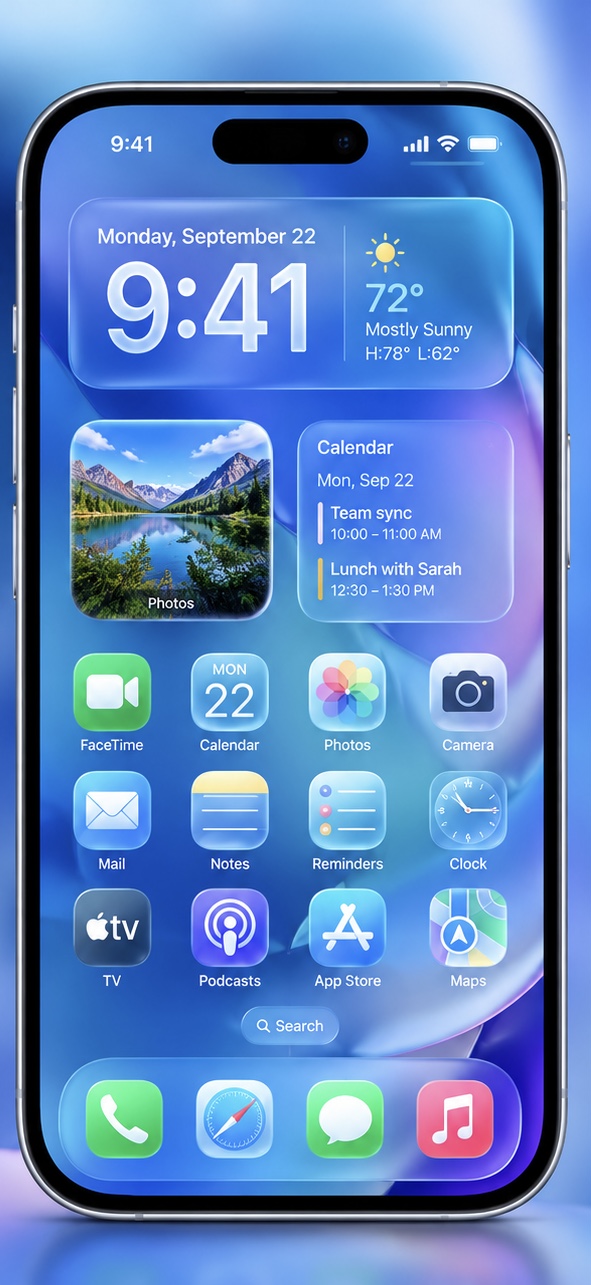
Improved Liquid Glass Interface
One of the best iOS 27 feature is the improved software design of the liquid glass interface. The changes includes:
- Uniform refraction and improved contrast with better text readability.
- Sharp and detailed app icons.
- Customize how Liquid Glass appearance with a new slider.
Siri Ai
With iOS 27, you can do more than ask question from Siri Ai. You can make a call, enhance your picture, create an event, send an email, use Siri mode in Camera and take more actions. Siri Ai now has a dedicated app which brings together all your conversations.
Relevant information while on a call
With the iOS 27 you can now get relevant information while on a call. Apple intelligence uses your call context to generate relevant information from across your apps such as confirmation code, booking number, tickets etc.
Dual Capture in FaceTime
One of the best feature of the iOS 27 is that it lets you video stream on FaceTime using the front and rear camera together. Both the caller and receiver devices has to run on iOS 27 to use the dual camera feature.
Customize Safari
You can now automatically group your tabs into topics, create your own extension or allow safari to notify you when a website make changes. When you tap the notify me button, select what Safari should look for such as price changes, restock etc.
Child Safety Feature
Parents can control what apps their kids use and websites they visit. The new Ask to Browse feature allows kids to request permission to access a new website. Parents also get to control how much time their kids spend on apps and websites by setting “time allowances” and “schedules”.
iCloud Shared Album From Android and Windows
iOS 27 allows Android and windows users can collaborate with iPhone users by joining and contributing their photos on iCloud. With shared album you get to send photos in their original format, control what others can view, react and comment on photos shared with other users.
Accessibility
With Apple intelligence, iOS 27 has improved features in VoiceOver, Magnifier, Voice Control, and Accessibility Reader to assist people with disabilities.
The VoiceOver and Magnifier now allows users to get a detailed description and ask question on what’s on their screen. With the new built-in translation, you can read text in your native language and get automatic captions or subtitles on Videos.
Perimenopause and Menopause Tracking
iOS 27 provides perimenopause and menopause cycle tracking in the health app. The health app will send a cycle deviation notification using your logged cycle history. The app also provides support with educational resources.
Enhanced Flyover in Maps
Apple map now uses aerial imagery and visual intelligence to represent descriptions on the map to give a sharp detail and stunning view.
Smarter Home
The iOS 27 unlocks new features in the home app that summarize a secure video footage before you watch, use Ai to search for a clip using your description, and now stream and record in 4K.
GymKit on iPhone
iOS 27 introduces GymKit to iPhone, allowing users to get real time information when connected to compatible cardio gym equipment such as treadmills, ellipticals, bikes, and stair-steppers. To track your heart rate while working out, use the AirPods Pro 3.
Note: Apple intelligence on iOS 27 is only available on iPhone 15 Pro or later models.
What are the new features in iOS 27?
The best iOS 27 features includes: Siri Ai powered by Apple Intelligence, improved liquid glass interface, get relevant information while on a call, dual capture in FaceTime, AI-powered accessibility features, perimenopause and menopause tracking, iCloud shared album with android and window users, customize Safari, child safety feature, enhanced flyover in maps, adjust AirPods sound, smarter home and GymKit on iPhone.
How to Upgrade my iPhone to iOS 27
To update your iPhone to Apple iOS 27:
Ensure you plug your phone are connected to an internet or Wi-Fi.
Go to settings > Click General > Click Software Update > Click “Download and Install”.
What iPhones can use iOS 27
The following phones starting from the iPhone SE (2nd generation and later) can use upgrade their iPhones to the use iOS 27 features.
iPhones below the iPhone SE (2nd generation and later) can’t upgrade their iPhones to the iOS 27.